Jellyfin for Android TV
- 4.5
- Rating
- 1.00M
- Installs
- Free
- Price

 Analysis by App-foxy
I approached Jellyfin for Android TV as a practical tool for managing and enjoying a personal video library rather than as another streaming service. That distinction matters from the first minute. The app is free, comes from Jellyfin, and is designed specifically for Android TV, so its value depends on whether you already have a Jellyfin server with your own media prepared. It is not an editor for cutting footage or adding effects; its creative role is closer to organizing finished work, reviewing it on a television, and deciding what is ready to share with other people in the household.
After spending time with it, I found the experience most convincing for people who make, collect, or manage video and want a television-friendly front end. A filmmaker checking a draft, a family sorting home recordings, or a creator keeping a private archive can all benefit from the large-screen presentation. Someone looking for a service that supplies films immediately, or a mobile editor that transforms raw clips into a finished video, should look elsewhere. The important question is not whether Jellyfin replaces a streaming platform, but whether it gives your own library a better viewing and handoff experience.
Starting with a library you control
The first creative decision happens before opening the Android TV app: how carefully the media library is prepared. Jellyfin for Android TV presents content that is managed through a Jellyfin server, so the quality of the browsing experience depends heavily on the structure and naming of the material behind it. When files are organized clearly, the television interface becomes a useful catalogue. When they are scattered across folders with inconsistent names, the app cannot magically turn that collection into a polished archive.
You May Also Like

 Blood Strike: 2.5 Anniversary
Blood Strike’s Loadouts Turn Every Drop Into a Tactical Gamble
A close look at Blood Strike’s custom loadouts: how fast access to signature weapons reshapes its battle royale rhythm, rewards preparation, and narrows the gap between fights.

 Pandora - Music & Podcasts
Pandora’s Music Is Easy to Start, but Harder to Recover
Pandora’s strength is its low-effort path from a seed to a station. Its weak spot is how much confidence it asks you to place in connection, setup, and quiet recovery.

 8 Ball Pool
 Is Built on Rivalries, Rematches, and Routine
A close look at the rivalries, rematches, shared routines, and unanswered safety questions that turn a quick pool match into a persistent mobile community.

 Samsung Music
’s Quiet Strength Is Playing What You Already Own
Its reach comes less from spectacle than from dependable access to a personal library. That simplicity is both the app’s strongest retention engine and its ceiling.

 AccuWeather: Weather Radar
AccuWeather Review: A Quick, Clear Forecast for Everyday Decisions
For everyday plans, the best forecast is the one you can understand quickly. AccuWeather makes rain timing, radar, and local conditions easy to act on, with a few trade-offs.

 Hill Climb Racing
Why Hill Climb Racing Still Turns Crashes Into One More Run
A tiny car, a bumpy hill and one more upgrade: Hill Climb Racing keeps resurfacing because its simple chaos makes every near-miss feel personal.
More From Our News Desk



This makes the app especially interesting for independent creators. I can imagine keeping finished cuts, reference videos, interviews, behind-the-scenes recordings, and family footage in one private place, then using the television as a review screen. Instead of connecting a laptop every time I want to show a project, I can open the library from the sofa and move through the available videos with a remote. That simple change makes informal review sessions much less awkward.
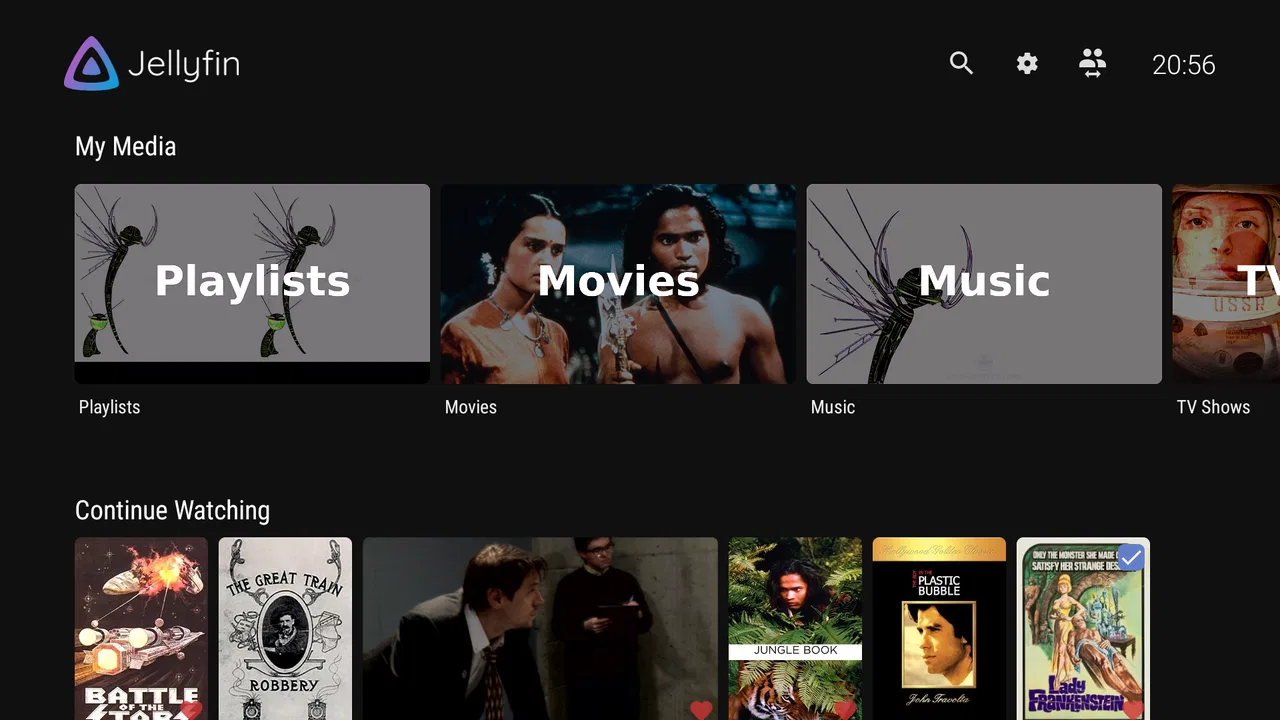
The Android TV focus also shapes who will enjoy it. The interface is meant to be navigated from a television rather than tapped on a phone. Posters, rows, titles, and playback choices need to be readable from a distance, and the remote becomes the main creative control. I found that useful when I wanted to browse finished material without turning the review into a computer task. It is less attractive if your main habit is watching short clips while travelling or managing files on a touchscreen.
Jellyfin has been available since late July 2019, and the current version is 0.19.7. Those details are useful context because this is not a brand-new experiment, yet the version number also reminds me to keep the app and server environment aligned when troubleshooting. A television client can feel unreliable when the real issue is an outdated or poorly configured server. Before blaming playback, I would check the wider Jellyfin setup and make sure the library itself is accessible.
The app is rated for Everyone, which fits its role as a media player and library interface. That does not mean every library is automatically suitable for every viewer; the content you add remains your responsibility. For a shared household, I would spend time arranging user access and library visibility before inviting children or guests to browse. That preparation is more important than any visual polish because a personal server can hold very different kinds of video in the same overall environment.
A realistic first project
Consider a small production team that has recorded interviews for a community documentary. The editor exports several review versions, places them in the Jellyfin library, and labels them consistently. During an evening meeting, the team watches each version on the living-room television instead of passing one laptop around. Notes can be made separately, but the app handles the valuable part: getting the correct video onto the big screen quickly and repeatedly.
That workflow is not the same as collaborative editing. I would not treat the Android TV client as a replacement for a timeline, a review platform with annotation tools, or a cloud delivery service. Its strength is the viewing stage after a file exists. The creative starting point is therefore about deciding what deserves a place in the library and who should be able to see it, not about building the video inside the app.
Making and reviewing without a traditional timeline
Once the server and library are ready, Jellyfin for Android TV turns the television into a straightforward playback station. I liked the separation between production and presentation: editing can happen on a computer or another device, while the finished or nearly finished files can be inspected from the couch. That separation is useful because a video that looks acceptable in a desktop preview may feel different on a larger display with normal viewing distance.
The app belongs to the Video Players & Editors category, but the “editor” part should not be misunderstood. In my use, it is a player and organizer rather than a tool for trimming, compositing, colour correction, captions, or sound mixing. There is no reason to open it expecting a creative workstation. Its contribution is managing access to the material and making playback convenient after the production work has happened elsewhere.
For a creator, that can still be a meaningful part of the process. I often find that reviewing a sequence in a relaxed environment reveals different problems from reviewing it while actively editing. Pacing may feel slow, dialogue may be harder to follow, or a transition may become more noticeable when I am not staring at a timeline. Jellyfin makes this kind of living-room check practical, provided the server can deliver the media smoothly to the television.
One useful habit is to keep review exports visibly separate from final masters. I would create clear library groupings or naming patterns for rough cuts, review copies, and approved versions rather than relying on memory. That reduces the chance of playing an old export during a family screening or sending someone the wrong file later. The app can display the material, but good version discipline still has to come from the person managing the library.
Another non-obvious advantage is the value of a central source for a household. If several people need to watch the same home movie or project, a server-backed library avoids repeatedly copying large files to USB storage or different devices. The trade-off is that the server becomes part of the viewing chain. If it is offline, inaccessible, or unable to handle a particular file smoothly, the television experience is affected even though the Android TV app itself may be installed correctly.
Where the remote helps and where it slows me down
Remote navigation is comfortable for broad browsing, but it is naturally slower than a keyboard when I need to search through many titles or maintain detailed organization. This is one reason I prefer to do serious library preparation away from the television. Once the content is named and arranged, the remote is enough for selecting a film, resuming a viewing session, or moving through a collection. For bulk management, a computer-based workflow remains more efficient.
I also recommend testing the exact kind of media you plan to watch before building an important screening around it. Playback depends on the server, the Android TV device, the network, and the file itself. A simple family video may work perfectly, while a demanding production export can expose limitations in processing or delivery. Testing a representative file is a practical safeguard, especially when the app is being used for a public presentation or a deadline-sensitive review.
Compared with conventional streaming apps, Jellyfin feels more personal and more dependent on preparation. Services such as Netflix or other subscription platforms are designed to provide a ready-made catalogue with minimal setup. Jellyfin is better when the catalogue is yours and you want control over where it lives. Compared with a USB drive plugged into a television, it offers a more organized browsing experience and easier access from compatible clients, but it introduces server and network considerations that a directly connected drive may avoid.
Iteration: using the television as a second opinion
The strongest creative use I found is iterative review. I can export a draft, place it in the library, watch it from the television, return to the editing setup, and repeat the process. The app does not create the revision notes, but it removes some friction between the edit and the audience perspective. That is valuable because creators can become too accustomed to seeing a project in the same small preview window where it was built.
For this workflow, I would use simple version labels that communicate both the project and the stage. A title such as “interview rough cut” is more useful than a vague filename copied directly from an editing application. I would also avoid deleting earlier versions until the current export has been checked. Keeping a short history makes it easier to compare changes, although an overfilled library can become confusing if every temporary render is treated as a finished item.
A particularly useful trade-off appears with shared viewing. Showing a draft to a collaborator in the living room can produce more natural reactions than sending a file and asking for written comments. On the other hand, the television interface is not a substitute for precise frame-based feedback. If a sound problem occurs at a particular moment, I would still record the time separately or return to a dedicated review tool. Jellyfin is excellent for seeing how the whole piece feels; it is less suited to detailed editorial annotation.
It can also help with audience testing inside a home. I might place two alternate cuts in the library and ask viewers which one feels clearer without explaining the differences first. This is a modest but useful method for checking pacing, tone, and accessibility from a normal viewing position. The result should not be treated as formal research, but it can reveal whether a sequence communicates outside the editor’s own perspective.
There is a practical limitation here: the app’s convenience does not remove the need to understand the server connection. If a draft is not appearing, I would check whether the file was added to the correct library, whether the server has recognized it, and whether the television client is connected to the intended server. This kind of troubleshooting is part of the Jellyfin experience, and it is the main reason I would not recommend it to someone who wants absolutely zero setup.
When another tool is the better choice
If the goal is to cut a vertical social video, add music, remove background noise, or create animated titles, I would choose a dedicated mobile or desktop editor. If the goal is to send a client a polished review link with comments and approvals, a specialist collaboration service may be more suitable. If the goal is simply to watch a few commercial films immediately, a conventional streaming application is easier.
Jellyfin for Android TV becomes the better choice when ownership, privacy, and personal organization matter more than instant catalogue access. It is also a good fit for people who already have a Jellyfin server and want a television client that respects that existing setup. The app does not need to win every category; it only needs to make a private library pleasant to use, and that is where its focus makes sense.
Export, screening, and handoff
For me, “export” in this context means the point where a finished file leaves the editing environment and becomes available for viewing by other people. Jellyfin can make that handoff feel more polished inside a household or small creative space. Instead of explaining which folder contains the latest render, I can direct viewers to the appropriate library area and let the television presentation do the rest.
I would still keep the original masters and project files outside this viewing workflow. A media server is convenient for access, but it should not be the only place where important creative work exists. My preferred approach would be to preserve the editing project and final exports separately, then copy an approved viewing version into Jellyfin. That keeps the library clean and reduces the risk of confusing a playback copy with the source material.
The app is free, and Jellyfin has passed one million installs, which suggests that the Android TV client has reached a substantial audience without changing its self-hosted character. I see the free price as a major advantage for creators who already have suitable hardware and want to avoid adding another subscription just to watch their own work. The hidden cost is time: server setup, organization, maintenance, and troubleshooting all require attention.
That cost is easiest to accept when the library has ongoing value. A single short project may not justify setting up a complete media server if a direct connection or local playback is enough. A growing archive of films, recordings, and reference material is a different story. In that situation, the ability to arrange everything in one place and reach it from a television becomes more valuable with each addition.
For a handoff to relatives, I would keep the presentation simple and test the account or library access beforehand. For a client, I would be more cautious: the app can provide a viewing route, but it is not automatically a professional delivery system with every approval, download, or protection feature a production workflow might require. I would use it for controlled screenings when the audience and server environment are familiar, not as my only method for formal distribution.
Compatibility and everyday reliability
The application requires Android 5.0 or later, so it is available to a broad range of Android TV hardware. Even so, operating-system compatibility is only one part of the experience. The television, server, network, and media format all contribute to playback quality. I would not assume that an older compatible device will provide the same smooth experience as newer hardware, particularly with demanding files.
In everyday use, the best routine is simple: keep the server reachable, keep the library tidy, and use descriptive versions for anything under review. When those three things are in place, the app feels calm and predictable. When they are ignored, the interface can expose the disorder rather than hide it. That is not a flaw unique to the television client, but it is an important part of deciding whether this approach suits you.
The public response is encouraging, with an average rating of 4.3 from around 2.6 thousand ratings and 103 written reviews. I read that as evidence of a generally positive reception rather than a guarantee that every Android TV setup will behave identically. A rating can tell me that the basic concept works for many people; it cannot replace testing the particular server and files I depend on.
My creator verdict
After using Jellyfin for Android TV as the viewing and management end of a creative workflow, I see it as a focused tool with a clear boundary. It does not make videos, edit timelines, or replace a professional delivery platform. What it does is give a personal Jellyfin library a television-friendly home, which can make reviewing, presenting, and organizing finished work much easier.
I would recommend it to a creator who already values a private media library, wants to review exports away from the desk, or needs a convenient way to show home productions to family and collaborators. I would also recommend it to anyone tired of copying videos between devices and willing to spend time maintaining a server. The free price and broad Android compatibility make trying it relatively approachable, but the real commitment is organizational rather than financial.
I would skip it if I wanted instant entertainment with no setup, mobile-first editing, detailed client annotations, or guaranteed simplicity. In those cases, a mainstream streaming service, a dedicated editor, or a specialist review platform will be a better match. Jellyfin’s strengths appear only when I accept its model: I provide the server and the media, and the app gives me a clean way to reach that collection from Android TV.
My final impression is positive because the app understands its place in the process. The creative work happens elsewhere, but the final viewing stage still deserves care. For turning a self-managed video archive into a practical living-room screening space, Jellyfin for Android TV is a thoughtful free option. I would prepare the library carefully, test important exports before a screening, and keep separate backups of the actual creative work. With those habits, it becomes more than a basic player: it becomes a dependable bridge between making a video and letting real people watch it.
FAQs for Jellyfin for Android TV
01What is Jellyfin for Android TV and how does it work?
Jellyfin for Android TV is a free and open-source media server app that allows you to manage and stream your personal media library across various devices. It works by setting up a server on your network, which organizes your media files. You can then access this content on your Android TV using the Jellyfin app, offering a seamless media experience.
02Is Jellyfin for Android TV free to use?
Yes, Jellyfin for Android TV is completely free to use. Unlike other media server apps, Jellyfin does not require any subscriptions or additional fees. It is an open-source project maintained by a community of developers, ensuring that users have access to its full range of features without any cost.
03What features does Jellyfin for Android TV offer?
Jellyfin for Android TV offers a variety of features, including support for multiple users, live TV and DVR capabilities, customizable libraries, and extensive metadata management. It also supports a wide range of media formats and offers offline media downloads, making it a versatile choice for media enthusiasts.
04Can Jellyfin for Android TV stream live TV?
Yes, Jellyfin for Android TV has support for live TV streaming. Users can integrate compatible TV tuners and access live TV channels directly through the app. Additionally, Jellyfin provides DVR functionality, allowing you to record live broadcasts and watch them at your convenience.
05What are the system requirements for Jellyfin on Android TV?
To run Jellyfin on Android TV, you'll need a device with Android 5.0 (Lollipop) or later. The app requires a stable network connection to stream content from the Jellyfin server. Ensure your server is properly configured and that your Android TV device has sufficient storage and processing power to handle media playback smoothly.
Pros
- Open-source and free to use.
- Supports a wide range of media formats.
- Customizable user interface.
- No ads or tracking features.
- Regular updates and improvements.
Cons
- Requires self-hosted server setup.
- Limited third-party app integration.
- Initial setup can be complex.
- No native parental controls.
- Performance depends on server quality.

Jellyfin for Android TV
Gallery